
Chrome extension · version 1.0.0
P2G Phonetic IME
Type the sounds you hear instead of the spelling you remember. Enter nɛsɪsɛri-style phonemes and P2G offers the matching words, and ranks whole phrases by how natural they sound together.
Try it
Click the box and type with your keyboard, or tap the symbols. ; s , d gives h ə l oʊ.
How to use it
Turn it on
Press Ctrl + Space on any page. A small window confirms that P2G mode is on. Press the same keys to turn it off.
Type sounds
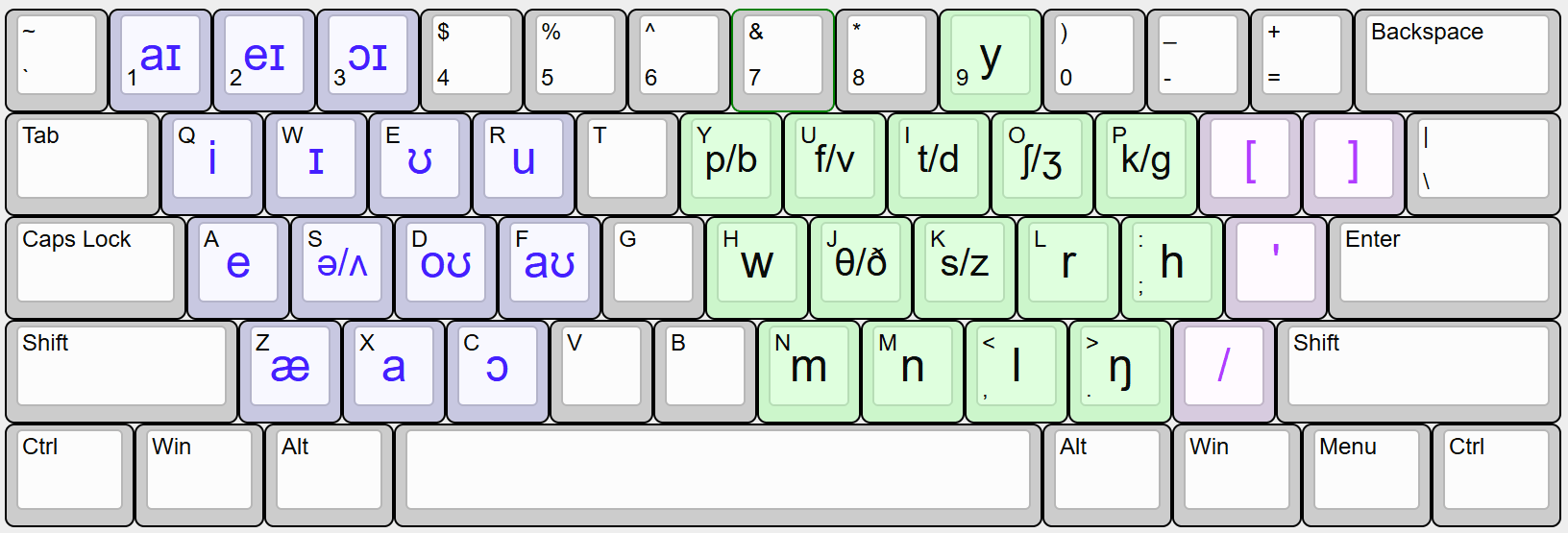
Click into any text field and type. Each key stands for one English phoneme, so there is no layout to install. Shift picks the paired sound: y is p and Y is b.
Choose a word
Candidates appear under the field. Use ← → or Tab to move and Enter to insert. Backspace removes the last typed symbol and Esc turns P2G off.
Type whole phrases
Put a space between words. P2G scores the word combinations with a bigram model built from real English text and puts the likeliest sentence first.
The key layout
One phoneme per key, grouped by sound type: vowels in blue, consonants in green.
How the prediction works
- Sounds to words. A database of IPA transcriptions covers more than 120,000 English words. Matching tolerates vowel alternation, up to two missing or extra phonemes between the ones you typed, and word prefixes.
- Words to phrases. A bigram language model over about 1.6 million words of text ranks the combinations.
- Candidates in stacked syllables. The window shows each candidate's sound in the same Syllastack notation as the Hover extension.
Privacy
The extension declares one permission, storage, used to remember whether P2G is on. Its script runs on every page you open, because it has to reach the text field you type into, so Chrome describes it as able to read and change data on all sites. It reacts to key presses only while P2G mode is on, and your keystrokes and text are never sent anywhere. Privacy policy